Showing posts with label Technology. Show all posts

Friday, April 20, 2012

Nerdiest Post On MarriedGeeks EVER

posted by He Said

So yeah, I have been really slacking about blogging lately.  Now I know I can blog using the web interface with blogger, but I use Live Writer.

Since December 11 of last year I have been receiving this annoying error.

"C:\Program Files (x86)\Windows Live\Writer\WindowsLiveWriter.exe"
The application has failed to start because its side-by-side configuration is incorrect. Please see the application event log for more detail.

And it has stumped me for months.  I have been googling and googling and I even tried binging a few times.  What did I find? Forum post after forum post of people with similar errors for all sorts of windows applications.

Tonight I found a post that went into this workaround.  Run the program, find the error in the application error logs, edit the XML file (WindowsLiveWriter.exe.config) and it is supposed to magically work.  Now he failed to say what exactly I was supposed to put in this XML file.

So I followed the steps and event viewer gave me this REALLY insightful message.

Activation context generation failed for "C:\Program Files (x86)\Windows Live\Writer\WindowsLiveWriter.exe".Error in manifest or policy file "C:\Program Files (x86)\Windows Live\Writer\WindowsLiveWriter.exe.Config" on line 1. Invalid Xml syntax.

Great.  Line one is fucked up.  Helpful.

So I opened the WindowsLiveWriter.exe.config file (not for the first time ever mind you, because I CAN read the error message), and what do I find in it?

One line.  One miserable line that reads:

<configuration>

Wow.  So in a fit of angry passion I deleted the file.  That’s right, I just flat out nuked it.  Then I double clicked the applications EXE expecting a big middle finger.

Instead, the program runs, it doesn’t create a new .config file and here I am ranting about it.

Tomorrow I will rant about the Republicans since I have so much pent up frustration I am sure that is why I just deleted the config file without a care in the world.

If I could only delete Republicans that piss me off so easily.

Tuesday, August 10, 2010

Good Karma

Posted by He Said


I found an iPhone 4 in the street today. In fact, I am pretty sure I clipped it with my front wheel before it registered what it might be. I stopped, picked it up, and it still worked! It wasn't even locked. I could have kept it, but I didn't. As much as I want the new iPhone, I couldn't keep it. All right, all right, my wife wouldn't let me. So I looked for a number labeled Home in the contacts and gave it a ring.

"Hello, I am calling from an iPhone I found in the street."
An uncomfortable pause.
"Do you have an iPhone?" I ask again.
"My son does?", and she yells away from the phone at her son "where is your iPhone?"

I can only imagine being that teenager at that moment and nearly crapping my pants. They came by and picked it up. And my reward? A nervously gracious thank you from a teenage boy. OK that and knowing I did the right thing. Oh hell, who am I kidding? He could have at least offered to mow my lawn.

Saturday, July 17, 2010

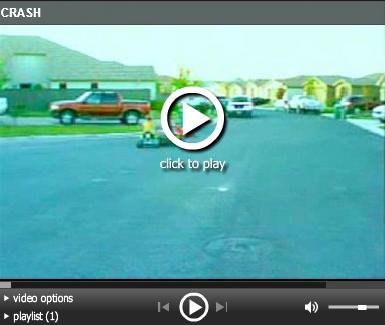
3GS Experiences Grip Of Death

Posted By He Said

I admit it.  I love new technology and I do respect the beauty of Apple products.  As such I bought She Said an iPhone 3G a few months after they came out.  I followed up with the 3GS for myself and then upgraded to an iPhone 4 for She Said. All this hoopla about dropped calls and the grip of death had me wondering. 

Does the 3GS suffer from the “Grip Of Death?”

Yes, yes it does.

Now I did this test before I had a chance to search the internet for this issue and I see that many others are having this issue.

Hey Mr. Jobs.  Can I have a free case too?

P.S. This video was recorded with She Said’s iPhone 4 while she was sleeping.  Don’t tell. Sorry about the video quality.  Apparently Dropbox compresses on the phone so I will have to copy the original off directly for better quality.

Wednesday, May 26, 2010

Dropbox Saves The Day, Then Screws With Me

Posted by He Said

While we were in Beijing there were several tools that made our life easier but none was more useful than Dropbox. This personal version control on steroids allowed me to quickly and easily share files with friends and family as well as come home from work to find my my recorded TV shows already on Susanne’s laptop as well as easily upload images to Picasa.  Picasa you ask (well if you don’t ask I will ask for you)?

Along with Facebook and Twitter we found that http://Picasaweb.google.com is blocked in China.  As this is my web album of choice it made it difficult for me to upload images. On the PC that we left at home I configured one album for each month we would be gone to automatically web sync to Picasa.  These three folders were located in my Dropbox folder.  This meant that all I had to do in China was drop my daily pictures into my Dropbox picture folders and wait for them to be magically synced to my PC here in Reno, then automatically uploaded and synced to my Picasa web albums (March, April 1 & 2, May 1 & 2).

2010-05-26_2319

It worked magically till the day it didn’t.

I used another tool of choice called LogMeIn (which allows me to control any PC from any other PC, or from my iPhone using LogMeIn Ignition) to access my PC only to find my C drive full!  The PC uses a small 30gb SSD drive as the primary boot partition and a secondary drive for everything else.  When I left I had 15gb free.  I kept logging in only to find the C drive full.  After some digging I found the issue. 

Dropbox keeps a cache of files deleted and active in a cache folder on the C drive.  Even after I had deleted my TV shows from Dropbox they were still being held onto in the cache location and filling up my boot drive and causing all kinds of havoc.

Dropbox does not natively support changing the location, nor can it be changed from the registry (that I am aware of).  In Windows 7 the files are stored in the C:\Users\YourUsername\AppData\Roaming\Dropbox\cache folder so installing the application to a different drive will not solve the problem.  After a quick search I ran across only one application to address this, and it did not meet my needs. DropBoxDataWrapper requires you uninstall Dropbox first and I did not want to do this.

So I fixed this myself and I didn’t have to uninstall and reinstall anything and now my C drive is happy.

Of course the week before I left China the Chinese government blocked Dropbox as well.  I think they wanted keep American Idol out of the country.  You know, to preserve their youth’s innocence.

How To Move The Dropbox Cache Folder

Windows 7 / Vista:

  1. Shutdown Dropbox
  2. Browse to your Dropbox cache location
    • Likely here c:\Users\YourUsername\AppData\Roaming\Dropbox
  3. Move the entire cache folder to another drive location. 
    • I created F:\Program Files\Dropbox\cache folder.
  4. Execute the command (using your correct path locations)
    • mklink /D C:\Users\YourUsername\AppData\Roaming\Dropbox\cache “F:\Program Files\Dropbox\cache”
    • Be sure to use quotes around the folder name if there are spaces
  5. You should see a new folder created in the location of your original cache location.  It will have a shortcut arrow, and if you open it, you should be directed to the new location of your cache folder.
  6. Restart Dropbox and rejoice

Windows XP

Windows XP does not include the mklink command.  You can use junction.exe or linkd.exe to create symbolic links7 using similar steps as shown above for Win 7/Vista.  Instructions for junction can be found at Microsofts Technet.


Saturday, May 1, 2010

A Saturday Quest

Posted by He Said

At home in Reno I have two friends.  Interestingly enough I knew them both for some time before they finally met each other and fell in love.  I actually had a little to do with her coming to work with me at my recent job where she eventually met, fell in love with and ultimately married my coworker.

He is an Anti-Apple Fanatic, Microsoft Fanboy who by looking at him you would think he is the secret love child between Bill Gates and… um… well if Bill Gates could self propagate you would have my friend. The woman is an Apple iPhone fan with an obsession for all things iPhone related (and a secret lust for an Apple computer I think).  They both rock.  I was lucky enough to be the best man at their wedding and am lucky enough to call them friends.

To protect the names of the innocent in this story, let’s call them “Kevin” and “Barbara.”

I come to China and find out the one and ONLY Apple store in all of China is right here in Beijing. A short 20 minute subway right and 15 minute walk away.  I HAD to go there so I could take pictures and share them with “Barbara.”

So here is the iconic apple logo on the store in Sanlitun Village, Beijing.

 _IGP6991

Here is the family pretending to try to get a call through on the oversized iPhone. We were not successful.

_IGP7006

Here is me NOT REALLY pretending to contemplate buying a Macbook Pro.

_IGP7008

These pictures were not really for “Barbara”, but so I could piss off “Kevin” FOR “Barbara.” I am pretty sure it was successful because every time he Skypes me he waves his quality wines in my face and says “oh, sorry, I keep forgetting all the wine you get in China is CRAP!”

I wanted so badly to take pictures to share with “Kevin”  of the Microsoft campus being built right behind my apartment.  Not FOR him, but so I could also piss him off, because I have been here and he hasn’t. Neener neener neeeener.  Yes.  I am a child. Alas, there are no signs to include in pictures so they could be one of 20,000 other new buildings being erected here in Beijing.

Instead I concocted the most wonderful plan.  The most wonderfully evil of all plans.  I found a new target.  A new location that only I could visit and “Kevin” would forever be jealous of.  This morning I managed to convince the entire family to embark on my Saturday quest.

This would take me about 20 minutes across two subway lines, one very busy transfer station and a 20 minute trek through a local sidewalk market complete with shoes, clothing, mobile tattoo & piercing parlors, “professional” phone screen protection installation stations, bead, book and yes, rabbit, turtle, snake and baby chicken salesmen. Let’s not forget the socks.  Everywhere we go someone is always trying to sell us socks or there are tables full of socks for sale.

_IGP7451 _IGP7444_IGP7440_IGP7505 _IGP7446 _IGP7453

As you can see I didn’t go alone on this quest.  I took the whole family with me, and as always, it was an adventure.

We stopped to feed the kids along the way (yes, at McDonald’s, shut up and leave us alone) and enjoyed more “Brangelina visits yet another location in Beijing and gets nonstop attention and praise” moments. By the way Braedyn is getting as much attention these days as Emily.

This sidewalk sales lady insisted Emily use her chair while we waited for Susanne to order food (using her iPhone of course).

_IGP7454_IGP7449 

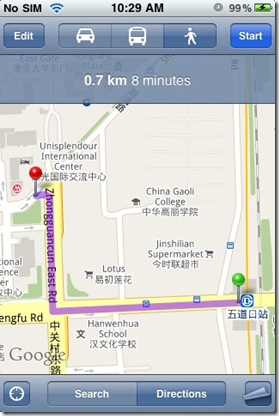
Then we headed up the street with me using a screencap of Google maps to find the destination of our Saturday Quest. You see it is too expensive to use AT&T here, and my phone has the latest software/firmware and cannot be unlocked to be used with ChinaTelecom.  So I can only use it online on a wi-fi connection. On the road, there is no live feed.
photo

We also had to make one stop along the way so that Emily could pretend to make a phone call home to Jacob.  It was very sweet.  For you young whipper snappers out there, that is a Pay Phone.  You can look it up on wikipedia.

_IGP7458

And there it is…in the distance…the object of our quest. Can you see it?

_IGP7457

That’s right.  Google Beijing headquarters.  The holy grail of Beijing Nerddom, and I found it WITHOUT an internet connection using a screencap from GOOGLE maps on my iPHONE.

Oh, the irony.

So here it is “Kevin.”  Google Beijing visited by the Moyle family just for you.

_IGP7474 _IGP7475_IGP7472

Oh, and you know that saying they have? “Don’t be evil.”  HA! The bastards wouldn’t even let me take pictures of the 10 foot red map marker in the lobby. I could understand if the secret to their search algorithm was printed on it. It looked like the ones you see here:

google beijing - Google Maps 522010 84105 AM.bmp 
Won’t let me take a picture? Hmph, see if I ever Google anything ever again.  Or better yet I will continue to use Google. I just wont ever click on any of your stupid ads, and I will tell all my friends…all two of them…never to click on your ads. We will drive you to BANKRUPTCY!

See how that works out for you, GoogleDevil! I JUST WANTED ONE PICTURE IN YOUR LOBBY!!!

Jerks.

I think I will go buy a MacBook now.

Update: Some of you with an attention to detail will likely point out that I said a 20 minute walk.  The Google map screenshot says 8 minutes.  Google Maps does not have an option to select Walk With Caucasion Children Through Beijing.

Sunday, March 21, 2010

I Think I Died And Went To Zhongguancun

Posted By He Said

I have heard so much about the bargain shopping and huge electronics markets in Beijing as best described by Wikipedia. “The name Zhongguancun to Beijingers is an abbreviation for these markets, where pirated software, gray market imports, refurbished and DIY products and fakes are widely perceived as being as common as legitimate products.”

What I didn’t realize is that my apartment is a mere 10 minutes away from the center of this hub of electronics heaven.  On our way to our first hot pot dining experience at Xiabu Xiabu (Shawbu Shawbu) we walked into one of these markets in a skyscraper.  At the time I had no idea where I was and was not prepared for the experience.

Websites list these places as markets within markets.  I describe them as unbelievable overwhelming amazing electronic heaven. In fact, there are so many things to look at and explore that the mind and body is overwhelmed and stimulated near physical arousal.  Yeah, it really is that cool, and I didn’t even buy anything. Ok, we did, but it wasn’t electronic and Susanne didn’t even try to bargain.  She must have been feeling a little tingling sensation too!

Now don’t tell anyone about this video because you aren’t supposed to take pictures.  I know this because the sign that said so in Chinese had the English subtitle “Do Not Teke (sic) Pictures”. But I took this before I knew where I was or had read any signs.

Today we were out walking and we explored a store called Off-Price Shopping Mall (上品优价百货).  This was like a Marshalls on steroids, with 7 levels.  The top level being a food court.  After a major disappointment that the 2 electronics levels were closed (whether temporarily or not I cannot say). This was the store I had been told to go to for good deals that could be trusted. When you ask locals if they would shop at the other e-markets the answer is either “If I go with you and you know what you want” or “no, they are crooks, they cheat you!”  So, with nothing else to do and me itchin’ for an electronics fix we we headed back to the area where I had recorded the crazy video above.

That’s when we met the Camera and PC pimps.  As we waited to cross the street two men approached us and pitched their wares in Chinese.  “English” we say. They smile.  It’s like that look that Bruce the shark gets in Nemo right before he says “I’m having fish TONIGHT!”

“Ah, you need PC? Good deal,” and the other man says “Camera? Cannon, Cannon?” and the chase begins.  They follow us across the street as we keep saying “no, no, no”. This was the moment that we quickly learned to spot the electronics pimps and we learned the easiest way to avoid them is to ignore them or act like you don’t understand a word they are saying (which is most often the case).  They are everywhere, and if you could see the inside of this building you would understand why.

Imagine if you will a football field, and on that field in the endzone you put 5 to 10 small booths (some with only enough room for one person to sit in), each selling something slightly different.  One has iPhone accessories, the other Nokia, Laptops, Netbooks, PC hard drives, webcams and more.  Make up your own electronic dream market in that endzone.

Now copy and paste it until the entire field is filled with copy after copy of that small electronic end zone bazaar that you have imagined in your head.

Now double it.

Now, copy that and put it on 6 different floors.

Now realize that is only ONE of the “markets” we have explored.

I will wait while you let that sink in - oh, and to stop laughing at the fact that I used a sports object for this analogy.

Now in reality each floor is heavier in focus than others.  One floor would be all laptop and PC’s, another all phone accessories.  I must have passed 5 Apple Authorised Retailor’s(sic) alone. Yeah, I am a little suspicious about that myself.  I am still baffled that any of the vendors in these buildings make a living doing this. Maybe its because there are SO many people here that they can based on the fact that if one booth is too busy, you will just go to the next?  How can 50 places selling all the same stuff in the same building make a profit?

After lunch at a McDonalds (yeah, don’t laugh, we have kids in China) where we were lucky enough to be offered a seat by an English speaking Egyptian Pastor on a mission (there is a joke here somewhere),  we were contemplating where to get our next iFix when we read a sign warning against the “illegal vendor” iPimps. As if on cue as we stepped onto the escalator to the basement level a man practically snuggled up against me showing me his worn out HP business card (yeah, in Chinese, like that helps) and was trying to usher us to his basement computer store.  Susanne and I took one look around and thought it was time to climb back on the up escalator. 

The iPimps sign on the way to the basement was appropriately placed.

During our wandering Susanne’s Starbucks detector went off and we were swiftly escorted (ok, we ran after her, me scooping up the kids and screaming for her to slow down) to get a coffee. 

While Susanne was off with Braedyn making the sacrifice, Emily and I watched from inside as a Logitech marketer shouted something obviously very important to the Chinese crowd growing around her.  She kept holding up these bags with the Logitech logo and something white and bulky inside with the same logo printed on it. While I sipped my Mocha (which was frickin’ heavenly btw after the Lemon Lime Sprite Green Tea Surprise), the music started and three women danced in unison outside the window.  I don’t know what it was they were dancing for, all I know is I didn’t know enough Chinese to score one of the giveaway items.

A Logitech branded work napping pillow.

Friday, January 8, 2010

Crashplan+Drobo+Workaround=Data Redundancy Love

UPDATE: 4-9-2015 It appears that updates to Crashplan over the last year have broken this method as well. I have since abandoned my Drobo for this and am using a esata drive plugged directly into my backup server.

I have had my Drobo for over a year now and have been very pleased with its reliability.  Several months ago I discovered the free backup utility Crashplan. 
If you are not familiar with Crashplan (regardless if you have a Drobo or not) you should definitely check it out).  Think of it as a peer to peer encrypted backup. 
The issue with it is that it does not natively support mapping to network drives.  There are workarounds on the forums for mapping a network drive to a drive letter, adding batch files to run from a task scheduler on login, blah blah blah, that JUST DON’T WORK consistently or easily.
This one does.
  1. Map your network Drive to a Drive letter.  In my case it is the S:\ drive and assign it to be persistent. (right Click, Map Network Drive and choose Reconnect on Logon).
  2. Download and install Crashplan (available for Windows, Mac and Linux)
  3. Click on the Destinations Tab on the Left.
  4. Click on the Folders tab on the top.
  5. Click the Select Button next to Select a backup destination folder.
  6. Configure it to backup to a LOCAL file location. Use something simply like c:\temp.  It should look something like this.image
  7. You can also select the name from the Available folders and then rename it in the Name: field on the right if you wish.
Crashplan runs as a service and a gui application.  You must shut down both for this next step.
  1. Close the application, and if the icon is still in your taskbar, right click and close it as well.
  2. To close the Crashplan service find Services under Administrative Tools in your Windows Control Panel.  Find the service named CrashPlanService and stop it or from a command prompt enter “net stop CrashPlanService” and you should recieve a message saying it was shutdown successfully.
  3. If you installed Crashplan to the default location then open the file
    c:\Program Files\CrashPlan\conf\my.service.xml
  4. Search the xml file for (if you are following my example)
    c:/temp/
    and replace with the network url for the drive and folder path you would like to map it to. In this example my Drobo is
    //DroboShare/Drobo/Shared/Backup/Crashplan/
  5. NOTE: The slashes are reversed and you must include the closing slash and is likely case sensitive.  Test your network url with correct slash marks first (Start->Run->\\DroboShare\Drobo\Shared\Backup\Crashplan)
  6. Replace all instances of the c:/temp/ throughout the XML file.
  7. Save and close the file and reboot.
On completion of restart, your Crashplan will properly map to your networked drive AND reference it via the Drive letter you mapped in the first step. 
image
Enjoy your networked storage with Crashplan integration!
UPDATE: I have moved my Drobo from my DroboShare and attached it to my TonidoPlug (LOVE IT).  This is a permanent move for me as the Tonido seems much faster than the DroboShare.  I configured my Windows 7 laptop as a test to point to this location in response to Anonymous comment below.  It works in this configuration as well. Interestingly it does not show the mapped drive letter as my Windows XP box does (image above with Drive S:) but it is working.
IMPORTANT: You will NOT be able to use the Browse button in Crashplan.  The problem is Crashplan has issues with networked drives, hence this workaround.
image

Monday, June 15, 2009

Look at All the Money You Could Save!

I will admit it to you. I’m one of the millions of people who have a gym membership. And don’t use it. I was pushed encouraged to join because I was informed I needed to get the feel-good endorphins pumping through my body through exercise, and because a professional I have a tremendous amount of respect for prescribed this, I took it upon myself to make it so. I sucked it up and joined a gym. Yeah, I know there are other ways to work up a sweat, but we have two small children in the house. ALL. THE. TIME. (If we went that route and waited until they were in bed each time, I promise I’d lock the door.) But come on, let’s be real. The professional said at least three times a week for 30 minutes each time. Pfffft!

Gym shopping was actually fun. I had three in mind that I was going to check out, but only made it to the first two. The third one was touted as a meat-market by both gym #1 and gym #2, so I took their word for it and stayed away from hunky young people ready to pump each other up. I didn’t want to seem like a chaperone after all.

I chose gym #1. Why?

  1. They have a kids center where I can drop off my munchkins while I work out, so I can’t very well use them as an excuse as to why I SUCK AT GETTING MY NOT-SO-FIRM BUTT THERE.
  2. The average age of my fellow sweaters is mid-thirties, so I won’t feel like a dirty old woman as my tongue hangs out at all the tight youngens as I lighten the weight load on each machine before I take my turn.
  3. All of the cardio machines have a TV hooked up to them, so I can’t possibly say I’m bored while exercising. I can zone out on crap TV. What could be better to get through the monotony of bicycling, climbing, or running in place? Unless, you know, each and every available channel is playing cooking shows. That’s right. *GASP* You can now say you know someone that doesn’t like cooking shows. Of course, those channels are probably all banned from the gym anyway. Otherwise, wouldn’t that be considered at least a little bit of a form of cruel and unusual punishment? The gym wants people to stay and work out; not go home and binge after all.
  4. They have a racquetball court. Greg and I can drop the kids off at the kids center and then duke it out in the court. Well, we all know how that one turned out.
  5. The place was freaking huge! There was a nice amount of space between machines, so no worries of needlessly offending the olfactory senses.

So why don’t I go? Blame Greg. Seriously; it’s his fault! For “my birthday” he got me a Wii Active, the fitness video game. And you know what? It rocks. IV Real. I can work out for 25 minutes, work up a sweat, get my heart racing, and all in the comfort of my ugliest clothes ever. Barefoot even. I don’t have to DRIVE anywhere. I don’t have to look like a dork in front of others. Well, besides my family, and they already know I’m a dork and love me in spite of it.

If you are looking for a way to work out at home and save the cost of a monthly gym membership but are tired of the same old Yoga tape you’ve had since the 1980’s, this is really the way to go. It’s 60 bucks (assuming you are geeks like us and already have the Wii gaming system), and it provides such a variety of exercises that it keeps it interesting and new. And it doesn’t let you slack at all. I’ve tried. Several times.

Now if I could just figure out a way to slack on that damn gym contract I signed.

Monday, February 9, 2009

Twitter Me This, Batman

Occasionally I like to play a digital version of connect the dots, but in my case the dots are people. For example, I sometimes like to see who some of my Facebook friends are friends with and then who they are friends with, and on down the digital line.

  • FB friend –>
  • FB friend –>
  • FB friend

When I follow a blogger, I will go to some of the blogs they follow and then check out the websites of some of the people who comment on those blogs.

  • Blog I follow –>
  • Blog they follow –>
  • Random comments by other bloggers –>
  • New blog

On Twitter I will see who else is following someone I follow, and who follows them, and I keep connecting the dots until I have found someone new to follow or in super special cases like that of Tee, Greg and I have her and her fiancé over for dinner.

  • Twit I follow –>
  • Twit they follow –>
  • Twit THEY follow –>
  • Dinner

Yeah, I guess Greg and I troll online for friends, but it is fun, and we have certainly expanded our virtual circle of friends this way (Uh, can you say I, Rodius and Libby Logic?)

I know Greg and I are not the only people who do this. Someone started following me on Twitter who follows someone I follow. So through this common denominator, she found me. Her Twitter page looked interesting, so I figured I’d follow her too. Um, not always a good idea. This morning, she twittered a link to an article that was clearly anti-Obama. So, I twittered back something that may not have been the nicest thing. You know, being the ObamaMama that I am, I couldn’t help myself. Oopsie.

Twitter me this, Batman. Could her twitter have been tongue-in-cheek? Maybe, but probably not. You know how I know? Because I played some more of digital connect the dots. I went to her Twitter page and looked at some of the people that follow her. All I have to say is EEK!

  • Her Twitter account –>
  • Twitter accounts of random people that follow her –>
  • EEK fest

Moral of the story? Make your husband comfort and feed the kids at night so you can play digital connect the dots with a clear head.

Saturday, January 31, 2009

Thou Shall Not Covet Thy Wife's iPhone

Or should you. I mean, really. This is one beautiful piece of equipment and whenever she gets out of the car, I can’t help but fondle it. Today when she jumped out of the car to get some wine (in a BOTTLE this time) for a dinner party with the family, the planets aligned, the sun obeyed my every command, and my camera captured the beauty of the moment. Unfiltered, untouched and unaltered in any way. It’s just meant to be held.

From 1-31-2009

Friday, January 16, 2009

Great. Everyone is On Our Blacklist. Now What?

This economy scares the crap out of me. I miss the days of things like, oh, having equity in my house. I know. Call me crazy. I never thought getting to decide between going to Bed, Bath, and Beyond or Linens & Things would be a thing of the past. Choosing between Cold Stone and Carvel? Not anymore. All the “Available Space” signs throughout town gives me the heebie jeebies. And I don’t like it.

The ultimate slap in corporate shut downs for us, namely Greg, is the latest announcement that Circuit City is going out of business, all 567 of their stores. Kaput. Bankrupt. Doors closed. If this announcement doesn’t make Greg pull out his hair, errr, wait… If this announcement doesn’t make Greg go screaming to the first place that will outfit him for a straight jacket, I don’t know what will. Seriously. You see, my dearly beloved has, one by one, stopped shopping at the electronics stores in town because of one thing or another. First it was The Good Guys. There is a long, sordid story about a hefty Sony Wega and a warranty wrapped around that place. We walked out of there and never went back. Then Best Buy came to town, and we gave them a shot. Wow, did they screw up with us. There’s a LONG story about a potential computer purchase and what Greg has deemed as the worst possible customer service in well, the history of all customer service anywhere, anytime. Worst Buy, as Greg and others affectionately call it, is a place where his ashes would be spread if he were Superman and Lex Luther got a hold of them. Taking him there would be like leading a vampire to light, a kid to a vaccination appointment, Wonder Woman to Cheetah. You want to get back at Greg for something? Trick him into thinking you are taking him to The Outback for Alice Springs Chicken but take him there instead.

So, the last electronics shop we were allowed to shop at in town is closing its doors. Sure, we can and do the online thing. But going to an electronics store is like getting to test drive a car before the big purchase. And let’s face it, Amazon took customer service lessons from Worst Buy. I swear that place is run by one person who laughs all the way to the bank, but pay no attention to that man behind the curtain.

So, the only place left to go electronics shopping is on our blacklist. Now what are we going to do to get our hands-on electronics fix? Anyone want to carpool to Sac?

Monday, October 13, 2008

Picasa Magic

I attempted to scan in a strip of very old 110 film I just had developed(that’s an antiquated film format for you young whipper snappers) using a cheap ass scanner that I purchased.  Here are the very poor results.  I am to blame for the condition of the film as it came from my sons old toy camera and I never stored it properly.

c 10-5-2008_001

10-5-2008_003

Now any skilled Photoshop user could spend time so you could see the details of these images.  This of course would require you to be a) skilled at Photoshop and b) own a copy of Photoshop. Now granted, these images are in BAD shape, and will never be quality printable images.  But I wanted to see them nevertheless.  I opened them up in Picasa (free if you were unaware) and used the cropping and the “I’m Feeling Lucky” button. 

10-5-2008_002 10-5-2008_001

10-5-2008_003

Whala, Pics of my Aunt Elaine, cousin Alex and my oldest son Jacob. As you can see, the images while not of the greatest quality become at least fun to look at and reminisce.  I could spend more time on them and improve them even more, but I wanted to show what a couple clicks can do.  On top of it I was pretty careless when scanning them and didn’t even bother to blow off the dust.  Picasa’s new Retouch tool is really quite smart and useful. Thank you Picasa.

Monday, September 29, 2008

But DADDY Can Do It

The more bells and whistles the sport of TV watching gets, the easier and more convenient for us as adults it becomes to partake. With DVRs we can start watching Desperate Housewives 25 minutes after it started, skip all the ads, and end up finishing at the same time we would have had we watched it live. Hey, that’s 25 more Facebook minutes! Whoohoo! We can watch both LOST and American Idol; no more picking one over the other. We can record our children’s favorite shows for playback at a more convenient time. These shows can then be watched over and over and over and over again until we as parents can quote Peep, Chirp, and Quack or Abby and Ty. With hit TV shows on DVD we can swiftly watch two seasons of Dexter in less than two weeks. Never mind the painful process of having to wait a whole year for the next season to come out on DVD! And my favorite bell and whistle? Pause and pee.

Greg LOVES to tease me about how I didn’t want the ability to pause live TV when he first suggested we get a DVR (then called a PVR) about eight years ago. I mean really, who NEEDS to do that? Aren’t we trying to save some money here? Can’t we just set up the VCR to record our shows? (Remember, this was about eight years ago. Don’t scoff at me TOO much.) OK, OK, he obviously won on THIS one, because I don’t know what I’d do without the ease of recording, pausing, skipping, and rewinding shows on TV. Oh, and then there’s the crucial pausing and peeing when the need calls. Sadly, for me, that’s a lot.

Two problems have risen from our TV watching. They were unforeseen, and they are pains in the ass.

First, the damn commercials. “Mommy, can you skip past the ads?” Sometimes Braedyn gets a “Sure, bud, hang on.” Other times he gets a, “Nope, sorry, it’s live tv.” Braedyn is going to be on the debate team one day. I am as certain of this as I am that I will need to pause and pee sometime tonight. Braedyn can argue with me until he is blue in the face. Or until I am. “But DADDY can skip past the ads.” “But I have SEEN you skip past them before.” “But why can’t you skip past them this time?”

Second, the damn commercials:

“Look at this toy, Mommy! I want THAT toy!” You don’t have enough saved up.

“Look at this toy, Mommy! It’s so COOOOOL!” You’re birthday is coming up; make a list.

“That toy flies, Mommy!” Christmas is coming. Ask Santa.

“Look at THIS, Mommy!” Ignore.

“Look, Mommy, you dip that cookie in milk and then it ‘tasteses’ YUMMY!” The ubiquitous THEY want you to THINK it tastes good so you’ll go spend your saved up money on what THEY want you to buy. That way THEY have money and YOU don’t.

“But we don’t have THAT cereal here, Mommy.” Because it’s not really cereal. It’s sugar in a box disguised to LOOK like a good breakfast idea.

“Whoa! I want THAT toy!” Um, you DO have that toy, and you don’t play with it now. “But it’s shaped different than the one I have.”

Oh, for the love of the flying spaghetti monster, help me now. Would someone please invent the commercialinator?

Sunday, September 21, 2008

It’s Not a Flip, But It Still Records Demolition Days

In 2002 for Festivus Susanne purchased a Kodak MC3 for $50 with the purchase of something or other and gifted it to me. At the time it was truly the undiscovered wonder of the world. It runs on three triple A’s, takes pictures, video and plays MP3’s. It still does a pretty fine job for old tech.

I pulled it out of the bottom of a box while cleaning the garage today, and while the video quality is not as good as some current models, its ease of use is still amazing. Shoot, plug in, copy QuickTime files off and share. Here is a vid of Emily and Braedyn practicing demolition derby with a neighborhood kid in the cul-de-sac.